Service Integration Event API
The purpose of the Service Integration Event API (hereinafter referred to as the SIE API) is to integrate external services and notify them of events occurring in Bosch IoT Rollouts.
The events published through this API are described below under Messages. As this list of events may be extended in the future, consumers are advised to ignore any unknown events.
The message transport is AMQP 0-9-1 compatible with message bodies in JSON.
AMQP basics
There are three basic concepts of AMQP:
- Exchanges - what you publish to.
- Queues - what you consume from.
- Bindings - configuration that maps an exchange to a queue.
Queues are just places to receive messages. Bindings determine how messages are delivered to them. Queues can also be bound to multiple exchanges.
Exchanges are for publishing messages. The user decides who can publish to the exchange and who can create bindings on it for delivery to a specific queue.
Exchange & Queue definition
Enabling the SIE API for a tenant automatically creates the necessary queues, exchanges, and bindings for the user.
The queue name for receiving event messages from Bosch IoT Rollouts is sievent_queue.
Bosch IoT Rollouts sends event messages to the sievent.exchange, which is bound to the sievent_queue.
As the SIE API is designed to notify consumers about events occurring within Bosch IoT Rollouts, it is not bidirectional, and therefore, it is not possible to send any messages to Bosch IoT Rollouts through this API.
Exchanges
| Exchange | Use case | Queue binding | Type | Durable | Auto-delete | User permissions |
|---|---|---|---|---|---|---|
| sievent.exchange | Send assignment events to a client | sievent_queue | Fanout | ✅ | ❌ | ❌ |
Queues
| Queue | Use case | Durable | Exclusive | Auto-delete | Arguments | User permissions |
|---|---|---|---|---|---|---|
| sievent_queue | Receiving the assignment events | ✅ | ❌ | ❌ | x-max-length=1000 x-message-ttl=86400000 //1day | READ |
Authentication & Authorization
You can connect to the queue in RabbitMQ using the same credentials as for the DMF API. See Authorization.
The credentials are provided via the Bosch IoT Suite portal, as part of the Access Credentials of your Bosch IoT Rollouts subscription.
Messages
Properties
| Header | Description |
|---|---|
type | Type of the message. Specifies the Rollouts component/entity affected by the event. |
topic | Topic name identifying the event. Specifies the use case with a unique String. |
tenant | The tenant this target belongs to. |
| Message Properties | Description |
|---|---|
content_type | The content type of the payload |
TARGET_CREATED
A message for this topic is published to the queue when a new Target is registered.
Message example:
Header | type=TARGET_EVENT |
|---|---|
Message Properties | content_type=application/json |
Payload | payload examplejson |
TARGET_UPDATED
A message for this topic is published to the queue when an Existing Target changes.
TIP
Check out the possible Target Update Status
Message example:
Header | type=TARGET_EVENT |
|---|---|
Message Properties | content_type=application/json |
Payload | payload examplejson |
TARGET_DELETED
The message for this topic is published to the queue when an existing Target is deleted.
Message example:
Header | type=TARGET_EVENT |
|---|---|
Message Properties | content_type=application/json |
Payload | payload examplejson |
TARGET_POLL_UPDATED
Fires when one or more targets poll the server (via DDI or DMF). A single event may contain multiple controller IDs if polls are batched.
Header | type=TARGET_EVENT |
|---|---|
Message Properties | content_type=application/json |
Payload | payload examplejson |
ACTION_CREATED
The message for this topic is published to the queue when a new Action has been created.
Message example:
Header | type=ACTION_EVENT |
|---|---|
Message Properties | content_type=application/json |
Payload | payload examplejson |
ACTION_UPDATED
The message for this topic is published to the queue when the existing Action changes (i.e., intermediate status or final status).
TIP
Check out the possible Action Update Status.
Message example:
Header | type=ACTION_EVENT |
|---|---|
Message Properties | content_type=application/json |
Payload | payload examplejson |
UPDATE_ASSIGNMENT
A message of this topic is published to the queue when a distribution set is assigned to one or more targets, i.e., by manual assignment, auto-assignment, or when a rollout group is executed.
One message will be published per assignment, even if the assignment involves multiple targets.
However, keep in mind that the published message can contain up to 1000 targets. Therefore, if a rollout group consists of more than 1000 targets, the event will be split into multiple messages.
When messages are not fetched right away, they will reside in the queue for 24 hours and will be deleted after that.
Payload template:
Click here to expand...
{
  "timestamp": long
  "softwareModules": [
    {
      "moduleId": long,
      "moduleType": String,
      "moduleVersion": String,
      "moduleName": String,
      "artifacts": [
        {
          "filename": String,
          "urls": {
            "COAP": String,
            "HTTP": String,
            "HTTPS": String
          },
          "hashes": {
            "md5": String,
            "sha1": String,
            "sha256": String
          },
          "size": long
        }
      ],
      "metadata": [
        {
          "key": String,
          "value": String
        }
      ]
    }
  ],
  "targets": [
    {
      "actionId": long,
      "controllerId": String,
      "targetSecurityToken": String,
      "type": String,
      "confirmation": "String"
    }
  ]
}
Message example:
Header | type=TARGET_EVENT |
|---|---|
Message Properties | content_type=application/json |
Payload | payload examplejson NOTE If the User Consent Flow feature has been enabled for the tenant, the |
System configuration
Enable/Disable Service Integration Event API
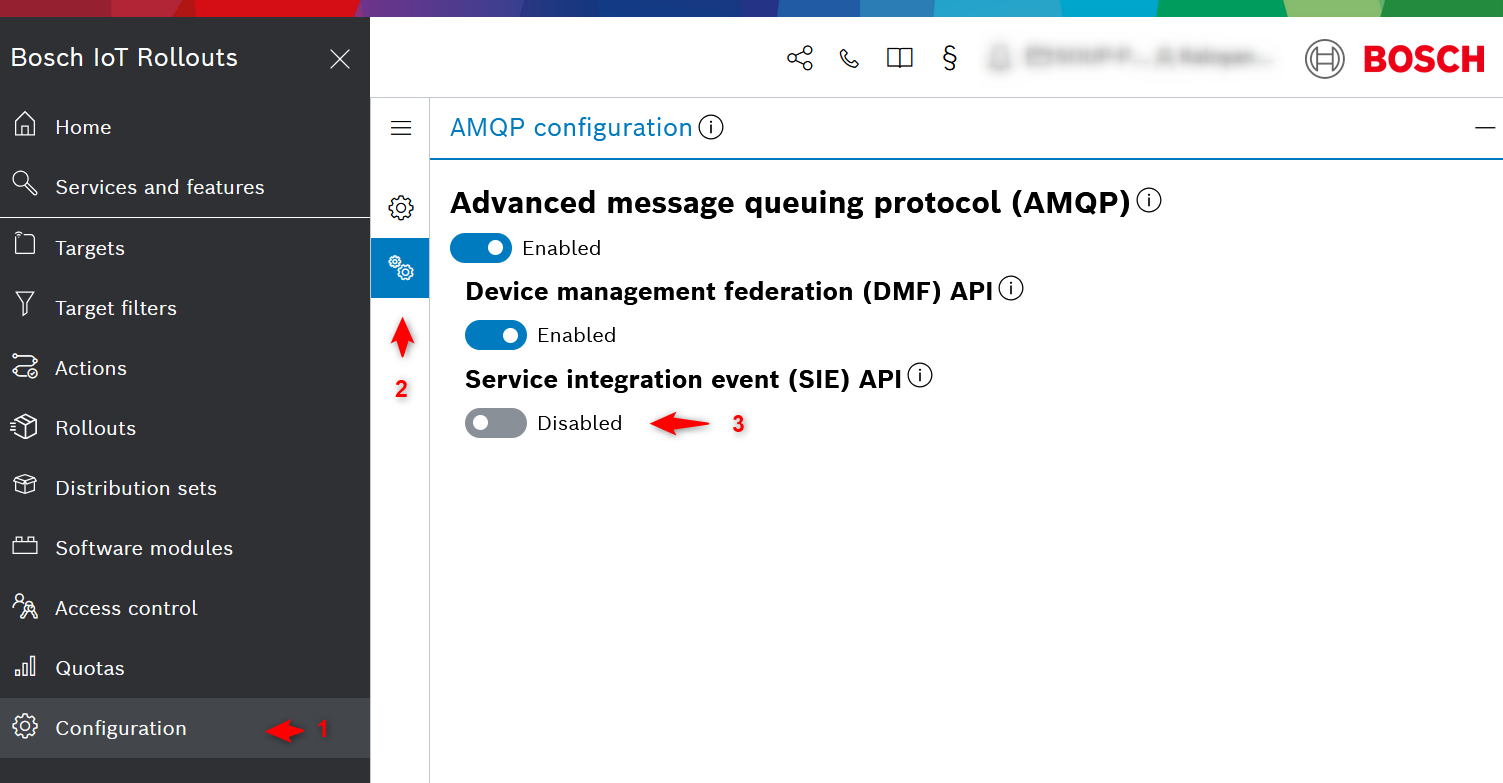
The SIE API can be enabled per tenant from the Bosch IoT Rollouts UI.
- Open the Configuration view and scroll down to the end.
- In the Configuration section, open the AMQP Configuration tab.
- Check that the Service Integration Event (SIE) API is enabled.
- Verify/change the configuration.
Configure Service Integration Event API supported Topics
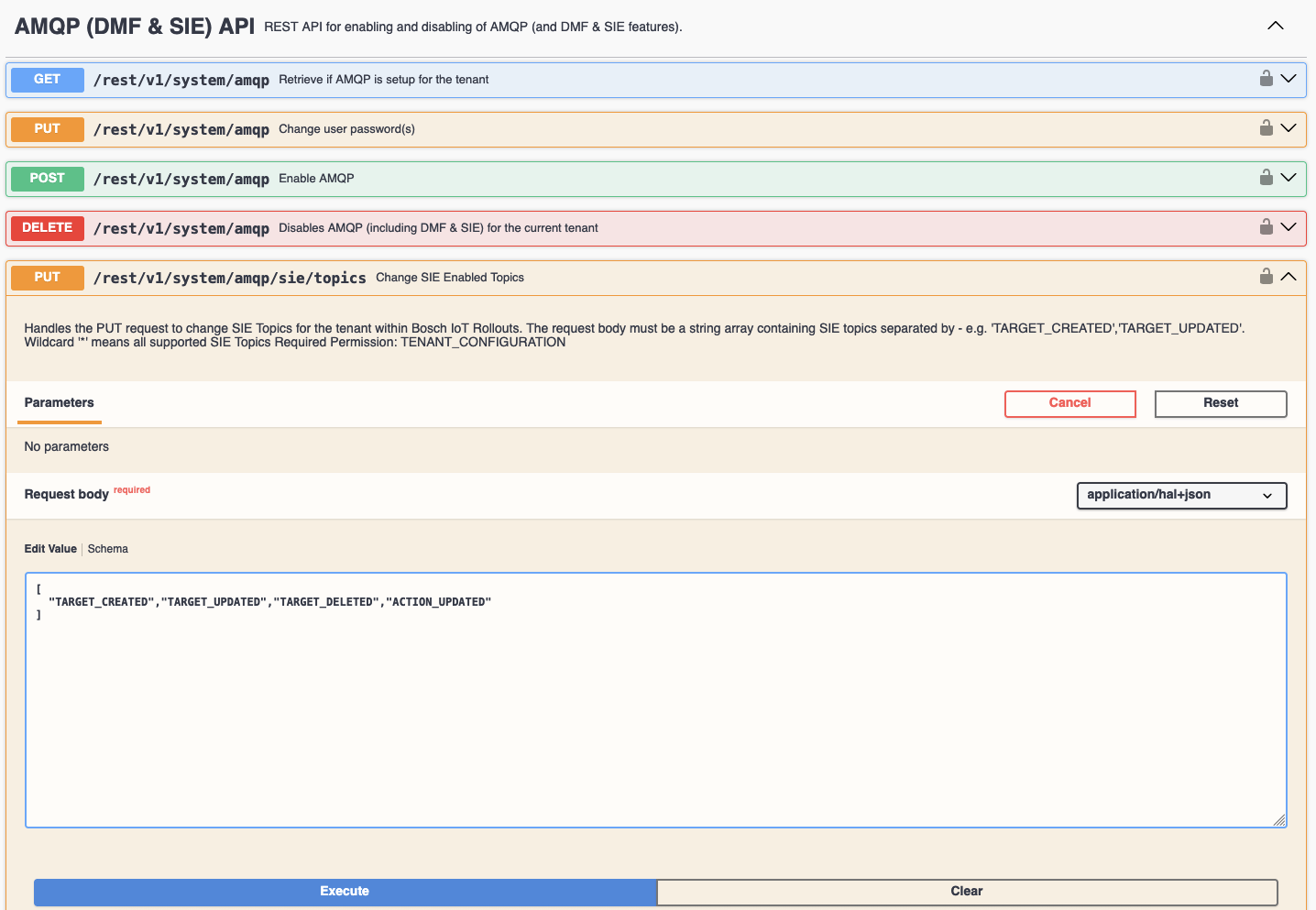
If the SIE API is enabled, all SIE API Topics are supported by default.
WARNING
Temporary, until UI supports the configuration, SIE Enabled Topics could be configured only via the REST API